> ## Documentation Index
> Fetch the complete documentation index at: https://bun-1dd33a4e-farm-e658f71f-system-wide-bunfig.mintlify.site/llms.txt
> Use this file to discover all available pages before exploring further.
# Test runner
> Bun's fast, built-in, Jest-compatible test runner with TypeScript support, lifecycle hooks, mocking, and watch mode
Bun ships with a fast, built-in, Jest-compatible test runner. Tests run in the Bun runtime and support the following features.
* TypeScript and JSX
* Lifecycle hooks
* Snapshot testing
* UI & DOM testing
* Watch mode with `--watch`
* Script pre-loading with `--preload`
Bun aims for compatibility with Jest, but not everything is implemented. To track compatibility, see [this tracking
issue](https://github.com/oven-sh/bun/issues/1825).
## Run tests
```bash terminal icon="terminal" theme={"theme":{"light":"github-light","dark":"dracula"}}
bun test
```
You write tests in JavaScript or TypeScript with a Jest-like API. See [Writing tests](/test/writing-tests).
```ts math.test.ts icon="https://mintcdn.com/bun-1dd33a4e-farm-e658f71f-system-wide-bunfig/NW8Sk37syP0KIejK/icons/typescript.svg?fit=max&auto=format&n=NW8Sk37syP0KIejK&q=85&s=a25d281cffed62521b09164567d2302e" theme={"theme":{"light":"github-light","dark":"dracula"}}
import { expect, test } from "bun:test";
test("2 + 2", () => {
expect(2 + 2).toBe(4);
});
```
The runner recursively searches the working directory for files that match the following patterns:
* `*.test.{js|jsx|ts|tsx|mjs|cjs|mts|cts}`
* `*_test.{js|jsx|ts|tsx|mjs|cjs|mts|cts}`
* `*.spec.{js|jsx|ts|tsx|mjs|cjs|mts|cts}`
* `*_spec.{js|jsx|ts|tsx|mjs|cjs|mts|cts}`
To filter the set of *test files* to run, pass additional positional arguments to `bun test`. Any test file with a path that matches one of the filters runs. Filters are commonly file or directory names; glob patterns are not yet supported.
```bash terminal icon="terminal" theme={"theme":{"light":"github-light","dark":"dracula"}}
bun test ...
```
To filter by *test name*, use the `-t`/`--test-name-pattern` flag.
```sh terminal icon="terminal" theme={"theme":{"light":"github-light","dark":"dracula"}}
# run all tests or test suites with "addition" in the name
bun test --test-name-pattern addition
```
To run a specific file in the test runner, make sure the path starts with `./` or `/` to distinguish it from a filter name.
```bash terminal icon="terminal" theme={"theme":{"light":"github-light","dark":"dracula"}}
bun test ./test/specific-file.test.ts
```
By default the test runner runs all tests in a single process: it loads all `--preload` scripts (see [Lifecycle](/test/lifecycle)), then runs every file in one shared global. Pass [`--parallel`](/test/parallel) to spread files across CPU cores instead. If a test fails, the test runner exits with a non-zero exit code.
## CI/CD integration
`bun test` supports a variety of CI/CD integrations.
### GitHub Actions
`bun test` automatically detects when it's running inside GitHub Actions and emits GitHub Actions annotations to the console directly.
No configuration is needed, other than installing `bun` in the workflow and running `bun test`.
#### How to install `bun` in a GitHub Actions workflow
To use `bun test` in a GitHub Actions workflow, add the following step:
```yaml title=".github/workflows/test.yml" icon="file-code" theme={"theme":{"light":"github-light","dark":"dracula"}}
jobs:
build:
name: build-app
runs-on: ubuntu-latest
steps:
- name: Checkout
uses: actions/checkout@v4
- name: Install bun
uses: oven-sh/setup-bun@v2
- name: Install dependencies # (assuming your project has dependencies)
run: bun install # You can use npm/yarn/pnpm instead if you prefer
- name: Run tests
run: bun test
```
### JUnit XML reports (GitLab, etc.)
To write a JUnit XML report, pass `--reporter=junit` together with `--reporter-outfile`.
```sh terminal icon="terminal" theme={"theme":{"light":"github-light","dark":"dracula"}}
bun test --reporter=junit --reporter-outfile=./bun.xml
```
`bun test` still writes to stdout/stderr as usual, and writes the JUnit XML report to the given path at the end of the run.
JUnit XML is a popular format for reporting test results in CI/CD pipelines.
## Timeouts
Use the `--timeout` flag to specify a *per-test* timeout in milliseconds. If a test times out, Bun marks it as failed. The default value is `5000`.
```bash terminal icon="terminal" theme={"theme":{"light":"github-light","dark":"dracula"}}
# default value is 5000
bun test --timeout 20
```
## Concurrent test execution
To run test **files** across CPU cores, see [`--parallel`](/test/parallel). The flags below control concurrency of tests *within* a file.
By default, Bun runs all tests sequentially within each test file. Concurrent execution runs async tests in parallel, which speeds up test suites with independent tests.
### `--concurrent` flag
Use the `--concurrent` flag to run all tests concurrently within their respective files:
```sh terminal icon="terminal" theme={"theme":{"light":"github-light","dark":"dracula"}}
bun test --concurrent
```
When this flag is enabled, all tests run in parallel unless marked with `test.serial`.
### `--max-concurrency` flag
Control the maximum number of tests running simultaneously with the `--max-concurrency` flag:
```sh terminal icon="terminal" theme={"theme":{"light":"github-light","dark":"dracula"}}
# Limit to 4 concurrent tests
bun test --concurrent --max-concurrency 4
# Default: 20
bun test --concurrent
```
The limit helps prevent resource exhaustion when running many concurrent tests. The default value is 20.
### `test.concurrent`
Mark individual tests to run concurrently, even when the `--concurrent` flag is not used:
```ts title="math.test.ts" icon="https://mintcdn.com/bun-1dd33a4e-farm-e658f71f-system-wide-bunfig/NW8Sk37syP0KIejK/icons/typescript.svg?fit=max&auto=format&n=NW8Sk37syP0KIejK&q=85&s=a25d281cffed62521b09164567d2302e" theme={"theme":{"light":"github-light","dark":"dracula"}}
import { test, expect } from "bun:test";
// These tests run in parallel with each other
test.concurrent("concurrent test 1", async () => {
await fetch("/api/endpoint1");
expect(true).toBe(true);
});
test.concurrent("concurrent test 2", async () => {
await fetch("/api/endpoint2");
expect(true).toBe(true);
});
// This test runs sequentially
test("sequential test", () => {
expect(1 + 1).toBe(2);
});
```
### `test.serial`
Force tests to run sequentially, even when the `--concurrent` flag is enabled:
```ts title="math.test.ts" icon="https://mintcdn.com/bun-1dd33a4e-farm-e658f71f-system-wide-bunfig/NW8Sk37syP0KIejK/icons/typescript.svg?fit=max&auto=format&n=NW8Sk37syP0KIejK&q=85&s=a25d281cffed62521b09164567d2302e" theme={"theme":{"light":"github-light","dark":"dracula"}}
import { test, expect } from "bun:test";
let sharedState = 0;
// These tests must run in order
test.serial("first serial test", () => {
sharedState = 1;
expect(sharedState).toBe(1);
});
test.serial("second serial test", () => {
// Depends on the previous test
expect(sharedState).toBe(1);
sharedState = 2;
});
// This test can run concurrently if --concurrent is enabled
test("independent test", () => {
expect(true).toBe(true);
});
// Chaining test qualifiers
test.failing.each([1, 2, 3])("chained qualifiers %d", input => {
expect(input).toBe(0); // This test is expected to fail for each input
});
```
## Retry failed tests
Use the `--retry` flag to automatically retry failed tests up to a given number of times. If a test fails and then passes on a subsequent attempt, Bun reports it as passing.
```sh terminal icon="terminal" theme={"theme":{"light":"github-light","dark":"dracula"}}
bun test --retry 3
```
Per-test `{ retry: N }` overrides the global `--retry` value:
```ts theme={"theme":{"light":"github-light","dark":"dracula"}}
// Uses the global --retry value
test("uses global retry", () => {
/* ... */
});
// Overrides --retry with its own value
test("custom retry", { retry: 1 }, () => {
/* ... */
});
```
You can also set this in `bunfig.toml`:
```toml title="bunfig.toml" icon="settings" theme={"theme":{"light":"github-light","dark":"dracula"}}
[test]
retry = 3
```
## Rerun tests
Use the `--rerun-each` flag to run each test multiple times. This surfaces flaky or non-deterministic test failures.
```sh terminal icon="terminal" theme={"theme":{"light":"github-light","dark":"dracula"}}
bun test --rerun-each 100
```
## Randomize test execution order
Use the `--randomize` flag to run tests in a random order. This helps detect tests that depend on shared state or execution order.
```sh terminal icon="terminal" theme={"theme":{"light":"github-light","dark":"dracula"}}
bun test --randomize
```
With `--randomize`, Bun displays the seed used for randomization in the test summary:
```sh terminal icon="terminal" theme={"theme":{"light":"github-light","dark":"dracula"}}
bun test --randomize
```
```txt theme={"theme":{"light":"github-light","dark":"dracula"}}
# ... test output ...
--seed=12345
2 pass
8 fail
Ran 10 tests across 2 files. [50.00ms]
```
### Reproducible random order with `--seed`
Use the `--seed` flag to specify the randomization seed and reproduce the same test order when debugging order-dependent failures.
```sh terminal icon="terminal" theme={"theme":{"light":"github-light","dark":"dracula"}}
# Reproduce a previous randomized run
bun test --seed 123456
```
The `--seed` flag implies `--randomize`, so you don't need to specify both. The same seed always produces the same test execution order.
## Bail out with `--bail`
Use the `--bail` flag to abort the test run after a given number of test failures. By default, Bun runs all tests and reports all failures, but in CI it can be preferable to stop early and reduce CPU usage.
```sh terminal icon="terminal" theme={"theme":{"light":"github-light","dark":"dracula"}}
# bail after 1 failure
bun test --bail
# bail after 10 failure
bun test --bail=10
```
## Watch mode
Like `bun run`, `bun test` accepts the `--watch` flag to watch for changes and re-run tests.
```bash terminal icon="terminal" theme={"theme":{"light":"github-light","dark":"dracula"}}
bun test --watch
```
## Lifecycle hooks
Bun supports the following lifecycle hooks:
| Hook | Description |
| ------------ | --------------------------- |
| `beforeAll` | Runs once before all tests. |
| `beforeEach` | Runs before each test. |
| `afterEach` | Runs after each test. |
| `afterAll` | Runs once after all tests. |
Define hooks inside test files, or in a separate file preloaded with the `--preload` flag.
```sh terminal icon="terminal" theme={"theme":{"light":"github-light","dark":"dracula"}}
bun test --preload ./setup.ts
```
See [Lifecycle](/test/lifecycle).
## Mocks
Create mock functions with the `mock` function.
```ts title="math.test.ts" icon="https://mintcdn.com/bun-1dd33a4e-farm-e658f71f-system-wide-bunfig/NW8Sk37syP0KIejK/icons/typescript.svg?fit=max&auto=format&n=NW8Sk37syP0KIejK&q=85&s=a25d281cffed62521b09164567d2302e" theme={"theme":{"light":"github-light","dark":"dracula"}}
import { test, expect, mock } from "bun:test";
const random = mock(() => Math.random());
test("random", () => {
const val = random();
expect(val).toBeGreaterThan(0);
expect(random).toHaveBeenCalled();
expect(random).toHaveBeenCalledTimes(1);
});
```
Alternatively, use `jest.fn()`; it behaves identically.
```ts title="math.test.ts" icon="https://mintcdn.com/bun-1dd33a4e-farm-e658f71f-system-wide-bunfig/NW8Sk37syP0KIejK/icons/typescript.svg?fit=max&auto=format&n=NW8Sk37syP0KIejK&q=85&s=a25d281cffed62521b09164567d2302e" theme={"theme":{"light":"github-light","dark":"dracula"}}
import { test, expect, mock } from "bun:test"; // [!code --]
import { test, expect, jest } from "bun:test"; // [!code ++]
const random = mock(() => Math.random()); // [!code --]
const random = jest.fn(() => Math.random()); // [!code ++]
```
See [Mocks](/test/mocks).
## Snapshot testing
`bun test` supports snapshot testing.
```ts title="math.test.ts" icon="https://mintcdn.com/bun-1dd33a4e-farm-e658f71f-system-wide-bunfig/NW8Sk37syP0KIejK/icons/typescript.svg?fit=max&auto=format&n=NW8Sk37syP0KIejK&q=85&s=a25d281cffed62521b09164567d2302e" theme={"theme":{"light":"github-light","dark":"dracula"}}
// example usage of toMatchSnapshot
import { test, expect } from "bun:test";
test("snapshot", () => {
expect({ a: 1 }).toMatchSnapshot();
});
```
To update snapshots, use the `--update-snapshots` flag.
```sh terminal icon="terminal" theme={"theme":{"light":"github-light","dark":"dracula"}}
bun test --update-snapshots
```
See [Snapshots](/test/snapshots).
## UI & DOM testing
Bun is compatible with popular UI testing libraries:
* [HappyDOM](https://github.com/capricorn86/happy-dom)
* [DOM Testing Library](https://testing-library.com/docs/dom-testing-library/intro/)
* [React Testing Library](https://testing-library.com/docs/react-testing-library/intro)
See [DOM testing](/test/dom).
## Large codebases
For a suite with thousands of test files, `bun test` has several knobs that stack: worker processes, isolation level, sharding across machines, and duration-aware scheduling. [Parallel & isolated test runs](/test/parallel) covers each in depth. Here is how they fit together, roughly in order of payoff:
**1. Use every core: [`--parallel`](/test/parallel#--parallel).** One worker per core, files handed out one at a time.
**2. Decide how much isolation you need.** `--parallel` gives every file a fresh global, which is the safe default and what Jest/Vitest do. If your files don't leak state into each other (they already pass under plain `bun test`, which shares one global), [`--parallel --no-isolate`](/test/parallel#every-file-is-isolated-unless-you-opt-out) lets each worker evaluate your imports and preloads once instead of once per file. On suites made of many small files, that is the single biggest win. See [how it compares](/test/parallel#how-it-compares).
**3. Split across machines: [`--shard=i/n`](/test/parallel#splitting-a-suite-across-ci-machines-with---shard).** Deterministic, no coordinator. Each CI job runs one slice, and each slice still uses `--parallel` locally.
**4. Balance by time, not count: [`--timings`](/test/parallel#balancing-with---timings).** With recorded durations, Bun cuts shards so each gets about the same total time. The split is longest-processing-time style, but keeps path-neighbours together so a worker's module cache stays warm. Each worker starts its slowest file first, and idle workers steal the slowest remaining file. That way, one long file that happened to start last doesn't hold up the run.
**5. Keep the timings fresh automatically: `--update-timings`.** Each shard writes the durations of the files it ran; the next run reads all of them. In GitHub Actions that looks like:
```yaml title=".github/workflows/test.yml" icon="github" theme={"theme":{"light":"github-light","dark":"dracula"}}
jobs:
test:
strategy:
matrix:
shard: [1, 2, 3, 4]
steps:
- uses: actions/checkout@v4
- uses: oven-sh/setup-bun@v2
- run: bun install
# last successful run's per-shard timings (nothing on the very first run)
- uses: actions/cache/restore@v4
with:
path: .bun-test-timings
key: bun-test-timings-${{ github.run_id }}
restore-keys: bun-test-timings-
- run: |
bun test --parallel --shard=${{ matrix.shard }}/4 --update-timings \
--timings=.bun-test-timings/next/${{ matrix.shard }}.json \
$(ls .bun-test-timings/*.json 2>/dev/null | sed 's/^/--timings=/')
- uses: actions/upload-artifact@v4
with:
name: timings-${{ matrix.shard }}
path: .bun-test-timings/next/${{ matrix.shard }}.json
save-timings:
needs: test
runs-on: ubuntu-latest
steps:
- uses: actions/download-artifact@v4
with:
pattern: timings-*
path: .bun-test-timings
merge-multiple: true
- uses: actions/cache/save@v4
with:
path: .bun-test-timings
key: bun-test-timings-${{ github.run_id }}
```
Every shard must read the *same set* of timings files for the shards to add up to the whole suite. That is why a run reads the previous run's files (restored from the cache), and why it writes its own where sibling shards still in flight won't pick them up (`next/` above). Add `--no-isolate` to the `bun test` line if step 2 applies to you.
**6. Within a file: [`test.concurrent`](#concurrent-test-execution)** for I/O-bound tests that spend their time awaiting.
## Performance
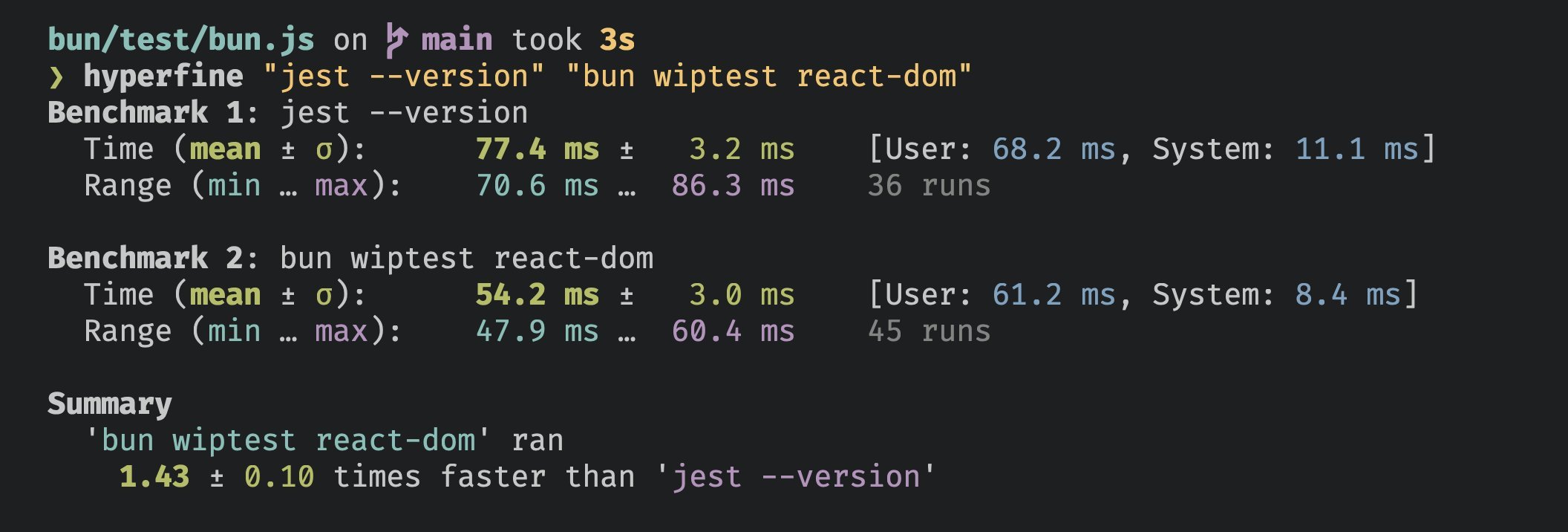
Bun's test runner is fast.
 ## AI Agent Integration
When you use Bun's test runner with an AI coding assistant, you can enable quieter output that keeps failure details but drops the rest of the noise.
### Environment Variables
Set any of the following environment variables to enable AI-friendly output:
* `CLAUDECODE=1` - For Claude Code
* `REPL_ID=1` - For Replit
* `AGENT=1` - Generic AI agent flag
### Behavior
When Bun detects an AI agent environment:
* Only test failures are displayed in detail
* Passing, skipped, and todo test indicators are hidden
* Summary statistics remain intact
```bash terminal icon="terminal" theme={"theme":{"light":"github-light","dark":"dracula"}}
# Example: Enable quiet output for Claude Code
CLAUDECODE=1 bun test
# Still shows failures and summary, but hides verbose passing test output
```
***
# CLI Usage
```bash theme={"theme":{"light":"github-light","dark":"dracula"}}
bun test
```
### Execution Control
Set the per-test timeout in milliseconds (default 5000)
Re-run each test file
## AI Agent Integration
When you use Bun's test runner with an AI coding assistant, you can enable quieter output that keeps failure details but drops the rest of the noise.
### Environment Variables
Set any of the following environment variables to enable AI-friendly output:
* `CLAUDECODE=1` - For Claude Code
* `REPL_ID=1` - For Replit
* `AGENT=1` - Generic AI agent flag
### Behavior
When Bun detects an AI agent environment:
* Only test failures are displayed in detail
* Passing, skipped, and todo test indicators are hidden
* Summary statistics remain intact
```bash terminal icon="terminal" theme={"theme":{"light":"github-light","dark":"dracula"}}
# Example: Enable quiet output for Claude Code
CLAUDECODE=1 bun test
# Still shows failures and summary, but hides verbose passing test output
```
***
# CLI Usage
```bash theme={"theme":{"light":"github-light","dark":"dracula"}}
bun test
```
### Execution Control
Set the per-test timeout in milliseconds (default 5000)
Re-run each test file NUMBER times to help catch certain bugs
Retry failed tests up to NUMBER times. Per-test {`{ retry: N }`} overrides this flag
Treat all tests as test.concurrent() tests
Run tests in random order
Set the random seed for test randomization
Exit the test suite after NUMBER failures. If you do not specify a number, it defaults to 1.
Maximum number of concurrent tests to execute at once (default 20)
### Test Filtering
Include tests that are marked with test.todo()
Run only tests with a name that matches the given regex. Alias: -t
### Reporting
Test output reporter format. Available: junit (requires --reporter-outfile), dots. Default:
console output.
Output file path for the reporter format (required with --reporter)
Enable dots reporter. Shorthand for --reporter=dots
### Coverage
Generate a coverage profile
Report coverage in text and/or lcov. Defaults to text
Directory for coverage files. Defaults to coverage
### Snapshots
Update snapshot files. Alias: -u
## Examples
Run all test files:
```bash terminal icon="terminal" theme={"theme":{"light":"github-light","dark":"dracula"}}
bun test
```
Run all test files with "foo" or "bar" in the file name:
```bash terminal icon="terminal" theme={"theme":{"light":"github-light","dark":"dracula"}}
bun test foo bar
```
Run all test files, only including tests whose name includes "baz":
```bash terminal icon="terminal" theme={"theme":{"light":"github-light","dark":"dracula"}}
bun test --test-name-pattern baz
```