

bun:sqlite module.
db.ts

bun:sqlite.
Features include:
- Transactions
- Parameters (named & positional)
- Prepared statements
- Datatype conversions (
BLOBbecomesUint8Array) - Map query results to classes without an ORM -
query.as(MyClass) - The fastest performance of any SQLite driver for JavaScript
bigintsupport- Multi-query statements (for example
SELECT 1; SELECT 2;) in a single call todatabase.run(query)
bun:sqlite module is roughly 3-6x faster than better-sqlite3 and 8-9x faster than deno.land/x/sqlite for read queries. Each driver was benchmarked against the Northwind Traders dataset. View and run the benchmark source.
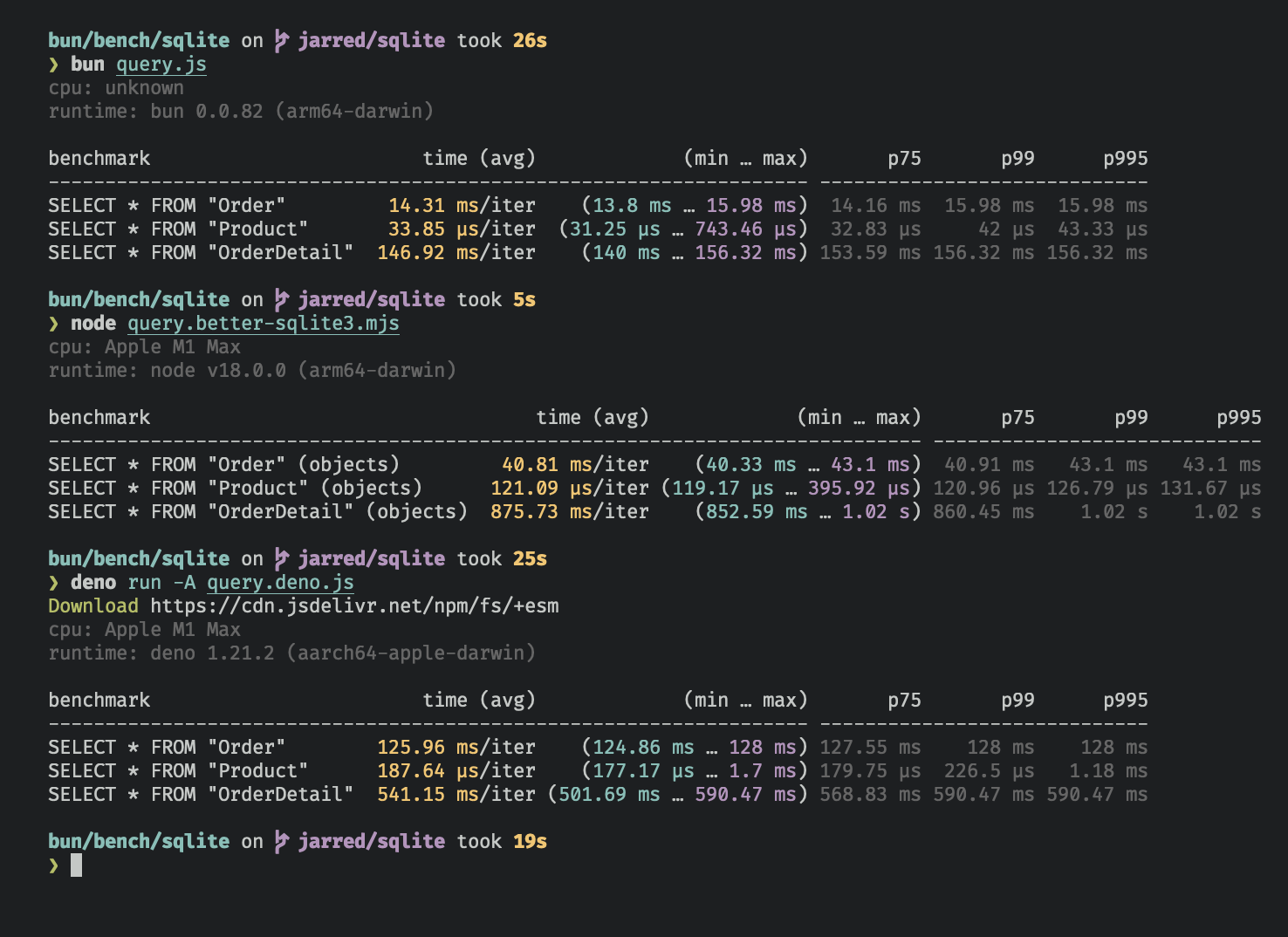
Benchmarked on an M1 MacBook Pro (64GB) running macOS 12.3.1
Database
To open or create a SQLite3 database:db.ts
db.ts
readonly mode:
db.ts
db.ts
Strict mode
By default,bun:sqlite requires binding parameters to include the $, :, or @ prefix, and does not throw an error if a parameter is missing.
To instead throw an error when a parameter is missing and allow binding without a prefix, set strict: true on the Database constructor:
db.ts
Load via ES module import
You can also load a database with an import attribute.db.ts
db.ts
.close(throwOnError: boolean = false)
To close a database connection but let statements created with .prepare() keep working until they are finalized or garbage collected, call .close(false):
db.ts
Database owns statements created with .query() and finalizes them immediately either way. Bun releases the underlying connection (and the database file handle) once the last outstanding .prepare() statement is finalized.
To finalize every outstanding statement, release the connection immediately, and throw if SQLite reports an error while closing, call .close(true):
db.ts
close() finalized throws Database has closed. Two exceptions: toString() returns an empty string, and finalize() stays safe to call.
close() is safe to call multiple times but has no effect after the first. One exception: close(true) after
close(false) still finalizes any remaining .prepare() statements. If a Database is garbage collected without
being closed, Bun releases the connection once every statement created from it has also been finalized or collected.
The using statement calls close(true).using statement
The using statement closes the database connection when the block exits.
db.ts
.serialize()
bun:sqlite supports SQLite’s built-in mechanism for serializing and deserializing databases to and from memory.
db.ts
.serialize() calls sqlite3_serialize.
.query()
Use the db.query() method on your Database instance to prepare a SQL query. The result is a Statement instance that is cached on the Database instance. The query is not executed.
db.ts
What does “cached” mean?The caching refers to the compiled prepared statement (the SQL bytecode), not the query results. When you call Use
db.query() with the same SQL string multiple times, Bun returns the same cached Statement object instead of recompiling the SQL. The cache holds the Database.MAX_QUERY_CACHE_SIZE (default 20) most recently used SQL strings. Evicted statements keep working, but a later db.query() with the same string compiles a new one.It is safe to reuse a cached statement with different parameter values:.prepare() instead of .query() when you want a fresh Statement instance that isn’t cached, for example if you’re dynamically generating SQL and don’t want to fill the cache with one-off queries.WAL mode
SQLite supports write-ahead log mode (WAL), which dramatically improves performance, especially with many concurrent readers and a single writer. We recommend enabling WAL mode for most applications. To enable WAL mode, run this pragma query at the beginning of your application:db.ts
What is WAL mode?
What is WAL mode?
In WAL mode, writes to the database go directly to a separate file called the “WAL file” (
-wal). SQLite also creates
a shared-memory index file (-shm) for read coordination. SQLite later integrates the WAL file into the main database
file. Think of the WAL file as a buffer for pending writes. Refer to the SQLite
docs for a more detailed overview.WAL sidecar file cleanup
When using WAL mode with a file-based database, SQLite creates two sidecar files alongside your database: a write-ahead log (-wal) and a shared-memory index (-shm). Whether SQLite removes these files automatically after .close() depends on your platform:
- macOS: Bun uses the system-provided SQLite, which Apple builds with persistent WAL enabled. The
-waland-shmfiles persist after close. This is not a bug — it is how Apple configured the system SQLite. - Linux and Windows: Bun statically links its own SQLite build, which follows upstream defaults. SQLite typically removes the sidecar files after close when no other connections are open.
db.ts
Statements
AStatement is a prepared query, which means it’s been parsed and compiled into an efficient binary form. It can be executed multiple times.
Create a statement with the .query method on your Database instance.
db.ts
?1) or named ($param or :param or @param).
db.ts
Statement with several different methods, each returning the results in a different form.
Binding values
To bind values to a statement, pass an object to the.all(), .get(), .run(), or .values() method.
db.ts
db.ts
strict: true lets you bind values without prefixes
By default, the $, :, and @ prefixes are included when binding values to named parameters. To bind without these prefixes, use the strict option in the Database constructor.
db.ts
.all()
Use .all() to run a query and get back the results as an array of objects.
db.ts
sqlite3_reset and repeatedly calls sqlite3_step until it returns SQLITE_DONE.
.get()
Use .get() to run a query and get back the first result as an object.
db.ts
sqlite3_reset followed by sqlite3_step until it no longer returns SQLITE_ROW. If the query returns no rows, the result is null.
.run()
Use .run() to run a query and get back an object with execution metadata. This is useful for schema-modifying queries (such as CREATE TABLE) or bulk write operations.
db.ts
sqlite3_reset and calls sqlite3_step once. Stepping through all the rows is not necessary when you don’t care about the results.
The lastInsertRowid property is the ID of the last row inserted into the database. The changes property is the number of rows affected by the query.
.as(Class) - Map query results to a class
Use .as(Class) to run a query and get back the results as instances of a class. The class’s methods, getters, and setters are available on each row.
db.ts
Object.create than new: Bun assigns the class’s prototype to the object, so its methods, getters, and setters work.
Bun sets the database columns as properties on the class instance.
.iterate() (@@iterator)
Use .iterate() to run a query and incrementally return results. This is useful for large result sets that you want to process one row at a time without loading all the results into memory.
db.ts
@@iterator protocol:
db.ts
.values()
Use values() to run a query and get back all results as an array of arrays.
db.ts
sqlite3_reset and repeatedly calls sqlite3_step until it returns SQLITE_DONE.
.finalize()
Use .finalize() to destroy a Statement and free any resources associated with it. Once finalized, a Statement cannot be executed again. Typically, the garbage collector does this for you, but explicit finalization may be useful in performance-sensitive applications.
db.ts
.toString()
Calling toString() on a Statement instance prints the expanded SQL query. This is useful for debugging.
db.ts
sqlite3_expanded_sql. The parameters are expanded using the most recently bound values.
Parameters
Queries can contain parameters. These can be numerical (?1) or named ($param or :param or @param). Bind values to these parameters when executing the query:
query.ts
db.ts
Integers
SQLite supports signed 64-bit integers, but JavaScript only supports signed 52-bit integers or arbitrary-precision integers withbigint.
bigint input is supported everywhere, but by default bun:sqlite returns integers as number types. If you need to handle integers larger than 2^53, set the safeIntegers option to true when creating a Database instance. The option also validates that bigint values passed to bun:sqlite do not exceed 64 bits.
safeIntegers: true
When safeIntegers is true, bun:sqlite returns integers as bigint types:
db.ts
safeIntegers is true, bun:sqlite throws an error if a bigint value in a bound parameter exceeds 64 bits:
db.ts
safeIntegers: false (default)
When safeIntegers is false, bun:sqlite returns integers as number types and truncates any bits beyond 53:
db.ts
Transactions
A transaction executes multiple queries atomically: either all of them succeed or none do. Create a transaction with thedb.transaction() method:
db.ts
db.transaction() returns a new function (insertCats) that wraps the function that executes the queries.
To execute the transaction, call this function. The transaction function passes its arguments through to the wrapped function and returns the wrapped function’s return value. The wrapped function also has access to the this context as defined where the transaction is executed.
db.ts
insertCats and commits it when the wrapped function returns. If an exception is thrown, the driver rolls back the transaction. The exception propagates as usual; the driver does not catch it.
Nested transactions — You can call transaction functions from inside other transaction functions. When you do, the inner transaction becomes a savepoint.
View nested transaction example
View nested transaction example
db.ts
deferred, immediate, and exclusive versions.
.loadExtension()
To load a SQLite extension, call .loadExtension(name) on your Database instance:
db.ts
macOS users By default, macOS ships with Apple’s proprietary build of SQLite, which doesn’t support extensions. To use extensions, install a vanilla build of SQLite.To point
terminal
bun:sqlite to the new build, call Database.setCustomSQLite(path) before creating any Database instances. (On other operating systems, this is a no-op.) Pass a path to the SQLite .dylib file, not the executable. With recent versions of Homebrew this is something like /opt/homebrew/Cellar/sqlite/<version>/libsqlite3.dylib.db.ts
.fileControl(cmd: number, value: any)
To use the advanced sqlite3_file_control API, call .fileControl(cmd, value) on your Database instance. See WAL sidecar file cleanup for a practical example.
db.ts
value can be:
numberTypedArrayundefinedornull
Reference
Type Reference